v0 (Vercel)
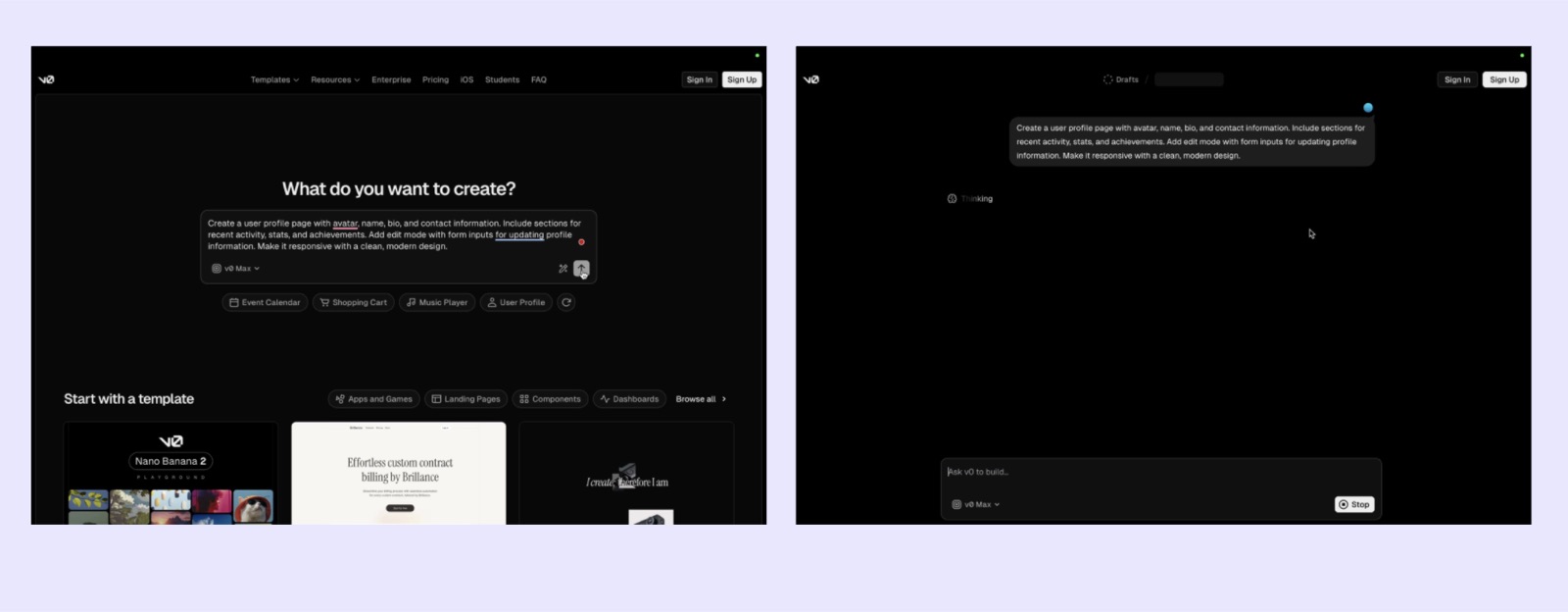
v0's landing page is the product: a "What do you want to create?" prompt box with one-click example chips and a template gallery. Per a third-party teardown, a logged-out visitor can submit a prompt and see v0 start generating before being asked to sign up.
Notes
- Growthmates' teardown of six AI builders found "4/6 AI tools asked me to sign up immediately, but V0 is not interrupting the first time to value" — generation starts after the prompt with no sign-up wall, and the sign-up flow is "almost invisible, with only 3 simple steps."
- The logged-out home shown in the teardown has Sign In / Sign Up top-right, a model selector ("v0 Max") in the composer, and example chips under the box (Event Calendar, Shopping Cart, Music Player, User Profile, plus a refresh icon) that fill the prompt for you.
- Below the fold, "Start with a template" is filtered by Apps and Games, Landing Pages, Components, Dashboards, with a Browse all link — templates are a secondary path, not a required step.
- After submit, the page becomes a chat thread under a "Drafts" breadcrumb showing a "Thinking" state while Sign In / Sign Up stay in the header.
- v0's own Quickstart still tells users to "Visit v0.app and sign in" first, then describe the app in natural language (examples: "A todo app with add, edit, and delete functionality"), refine in Code or Design mode, and deploy through the Publish control in the chat header.
- The docs home frames onboarding by role — e.g. designers can "Clone pages with screenshots or Figma files," engineers can "Create React components."
- Vercel's official prompting guide teaches new users a three-part prompt: product surface, context of use, and constraints and taste. The reasoning: vague prompts make v0 guess, and a detailed prompt came out "19 seconds faster, 152 fewer lines, lower cost" in their test. The guide treats v0 as a collaborator whose output "depends on how clearly you communicate" (Vercel Blog, 2025-12-15).
Patterns
prompt before signupexample prompt chipstemplate gallerysingle prompt box homerole-based docs entryprompt-writing education
Articles
- Quickstartv0 Docsby the team
- v0 Docsv0 Docsby the team
- How to prompt v0Vercel Blog (Esteban Suárez, 2025-12-15)by the team
- Your onboarding should become invisibleGrowthmates (Kate Syuma)